
 Fax: 508-651-2674









Tolu’s Tips for Active and Inclusive Training
In her new book Designing and Facilitating Workshops with Intentionality, author Dr. Tolu Noah offers ten principles to help focus workshop design efforts. It’s all wrapped up into a tool she refers to as the Workshop Wheel. In her recent Show & Share session with Trainers Warehouse, Tolu focused on two of the ten — ACTIVE and INCLUSIVE, and boy, did she practice what she preached. Following are some of the tools she used to build activity and inclusivity into the session.
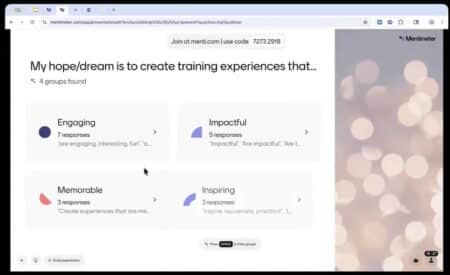
TRY MENTIMETER – TO BUILD INTERACTIVITY
Ask participants to share their input through Mentimeter.com. In Tolu’s example, she began our session by asking participants to share their “training hopes and dreams.” Rather than relying simply on a Chat board, she used Mentimeter. She posted a single QR code that could be scanned by phone, as well as a URL link and code, for computer access. Quickly, participants could weigh in and share their input. Although accessing a code like that may take a tad more time than a simple chat, it also felt more interactive for a few reasons:
- It was much more interesting to view visually
- Responses were easier to read
- Use of the phone invited a more tactile experience than just interfacing with the computer and keyboard.
- Most importantly, Mentimeter’s AI can synthesize the group’s results just by clicking the space bar. After that, if you want to dig deeper into a specific response, just click that box and see all the associated responses.
EMBED SOME FUN INTO YOUR SLIDES
Dr. Noah used a handful of extremely accessible tools to manage the time and ambiance during breakout or reflection moments. For instance, she embedded these resources:
- Bensound – Music clips for presentation audio. Embedding the sound clips made them easy to access with the click of a button. Great for thinking time during work exercises.
- 30-second timer – Search for “acoustic guitar timers, find the amount of time you need, and embed it into your slide. Two recommended YouTube channels are Adam Eschborn and Gentle Acoustic Guitar.
EXPLORE SLIDE DECKS BEYOND POWERPOINT
- Google Slides: Tolu shared that she prefers to use Google Slides for presentations. She explained that if you like to navigate to multiple other websites and flip from presentation to links, it’s very convenient. You can also “pin” tabs so they’re easy to find and navigate.
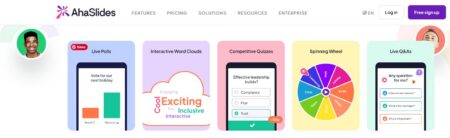
- Aha Slides: at a prior Show & Share, Cornelius “Nelius” Dowdell, expert facilitator and founder of The Best Workplace, used AhaSlide as an alternative to PowerPoint. Also web-based, Aha Slides allowed him to seamlessly embed word clouds, live polls, spinners, and more.
TRY PADLET FOR COLLABORATION ACTIVITIES
While asking chat-based questions and polling participants is better than not checking in with the group at all, a better approach is to draw on a wonderful suite of interactive tools from an online platform like Padlet. Facilitators can easily customize visually pleasing templates that allow participants to consider questions and share responses to thought-provoking questions in a myriad of ways that are more fun and accessible than standard whiteboards. They have two basic tools that allow you to make:
- Boards: blank slates to which you can add text, music, videos, and more. They have dozens of templates ready-to-go for discussion boards, polls, Q&A, surveys, brainstorming, feedback, breakout groups, etc.
- Sandboxes: collaborative digital canvases with tools for drawing, writing, and adding media. Sandbox templates are available for lessons, brainstorming, Jeopardy, interactive documents, group activities, and more.
Don’t be put off by the graphics. At first glance, Padlet appears to be geared toward K-12 instructors, but because each Board and Sandbox starts with a blank slate, you can easily customize the look and feel. When you click into a template, it does not look juvenile, as the website graphics might lead you to assume. It also allows you to welcome participants to add comments by typing, sharing a video, recording audio, or even capturing a screen record.
ACRONYMS & MNEMONICS
Tolu shared the A.P.A. acronym as a way to engage participants throughout a learning session. For each part, she offered an array of tools. Some used the resources mentioned above; others drew on “old school” approaches.
A. Activate prior knowledge, as learning always builds on a scaffolding of prior knowledge.
P. Process new information. Give time to synthesize, ask questions, make connections, etc.
A. Apply learning, because practice with feedback enables improvement.
OLD SCHOOL ACTIVITIES
Retrieval and Writing
After introducing the 10 principles, Tolu asked us to recall as many as possible by writing them down on paper or opening a writing app on an electronic device, without looking at notes we might have taken. She reminded us that the retrieval process is an important part of long-term memory processes. Although most of us could recall only three to five of the 10 design principles after her very quick overview, the exercise served as an important lesson about the importance of analog approaches and retrieval activities. She introduced a handful of other approaches as well:
1. HANDOUT: Anticipation Guide (Activation)
To explore what people already know and begin to activate prior knowledge, Dr. Noah suggests preparing an “Anticipation Guide” containing 5-7 statements about the topic at hand. To facilitate this activity, ask attendees to record if they believe the statement is True or False. Before putting their notes to the side, have them team up with a colleague to discuss their answers. At the very end of the session, revisit the participants’ Anticipation Guides, and ask them to reflect on how their prior understanding grew or evolved.
CREDIT: This strategy comes from several sources, including Frederick A. Duffelmeyer and Facing History & Ourselves.
2. HANDOUT: Knowledge (or Skills) Rating (Activation)
Another great worksheet to help learners consider prior knowledge is one that asks them to self-assess their knowledge before a session starts. It’s like a “Before Report-card.” With each concept on the learning agenda, they can check a box that says, “I don’t know what this means,” “I have seen or heard of this, but don’t know the meaning,” “I can explain the meaning of this,” or ” I could teach someone else about this topic.”
CREDIT: Jonathan Bifield, Eberly Center at Carnegie Melon University, and others.
3. T.Q.E. PAUSES: Elicit Thoughts, Questions, and Epiphanies
Pause and ask attendees to share their thoughts, questions, and epiphanies about the training topic! You can use sticky notes, chat, or really any tool, digital whiteboarding tool, verbally (sticky notes, chat, a digital whiteboard tool, or have attendees share verbally). Be sure to process these replies before you move on!
CREDIT: Adapted from an approach used by Marisa Thompson.
4. PARTNERING CARDS
Rather than finding partners on the fly, take a few minutes at the start for folks to fill out their Discussion Partners Card, finding a different person to partner with for each of the upcoming discussion chunks. When those junctures arrive, have them find that partner.
CREDIT: Letitica Citizen and Kia Turner
5. WOW-HOW-NOW REFLECTION ACTIVITY
Using a Padlet Sandbox with three pages for input, Tolu led us in an inclusive activity that drew out important learning points and action items. If you’re looking for another reflection tool to add to your repertoire, this is a great one!
- Wow – key takeaway
- How – remaining question
- Now – action item
CONCLUSION
At its core, effective training isn’t about adding more tools—it’s about being intentional with the ones we choose. As Dr. Tolu Noah’s session demonstrated so clearly, when we design with purpose—prioritizing activity and inclusivity—we create experiences that learners don’t just attend, but truly engage with.
Whether it’s leveraging digital tools like Mentimeter and Padlet, or incorporating “old school” strategies like retrieval, writing, and structured reflection, the goal remains the same: help learners think, connect, and apply. Because, as we know from brain science, people remember what they take time to process.
The real takeaway? Small shifts in design can lead to big shifts in learning.
RESOURCES
Tolu’s Session Resources: Tolunoah.com/trainerswarehouse26



PRODUCTS YOU’LL LOVE!

Easily "gamify" learning events