
 Fax: 508-651-2674









Interactive Training Tips from Cindy Huggett & Katrina Kennedy
At our Show & Share sessions with Katrina Kennedy and Cindy Huggett, I gathered so many interactive training tips that I had to pass them along. Both focused on interactivity and engagement, but from different angles: Katrina, with her upcoming book, Learning that Lasts, focused on Reviews and Reflection; Cindy, on using games to boost online learning. Several common themes emerged. As I intersperse the tips I got from each of these wise women, I’ll note the source of each suggestion (CH for Cindy; and KK for Katrina). You can also watch their full sessions at the Trainers Warehouse Show & Share website.
INTERACTION FROM THE GET-GO
Cindy talked about “early engagement and immediate interactivity,” and Katrina about “Pre-flection.” Either way, the intent is the same: to set the stage for participatory learning and prime the brain for learning. So, skip long introductions and dive straight into participation. Just say hello and welcome, then try these quick opening questions:
- Engagement Scale (CH): “On a 1–7 scale, how engaged do you expect to be today? Type your answer in chat.” Then ask, “how could we increase that by 1?”
- Legitimacy Check (KK): “You have two minutes to ask me anything that proves I’m legit. Raise your hand or type in chat!” Then answer as many as you can in that time.
- Prior Knowledge (KK): “What do you already know about this subject? Take 1-minute to type that into the Chat.
Dry-Erase Answer Boards by Trainers Warehouse BUY NOW
MAKE IT SOCIAL
Make it social, visual, and tactile, from the outset. Ask the group to start in a gallery view, and say:
- Warm Welcome (CH): “In a moment,” (always give a warning of what’s coming next) I’ll ask you to unmute and turn on your video, so you can (choose one) say hello, wave to the group, hold up your favorite coffee mug or desktop item. You can also welcome them to use an avatar or blur their background.
- Quick Breakout (CH): In groups of 2–3, introduce yourself and describe your day in 3 words. To eliminate awkward beginnings, tell them who speaks first (i.e. the first alphabetically by first name).
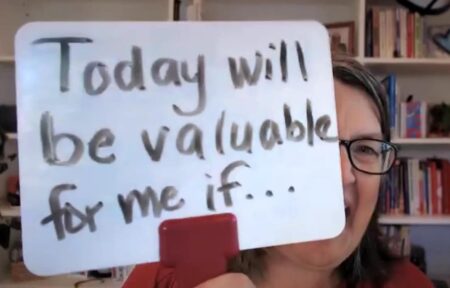
- Goal Setting (KK): “On paper or a Dry-Erase Answer Board, finish this sentence: Today will be valuable for me if…” After two minutes, have the group hold their goals to the camera for a screenshot.
CREATIVE WAYS TO INTRODUCE CONTENT
Instead of talking through your agenda slide, consider these clever techniques:
- Background Trick (CH): Create your agenda (or opening question) in PowerPoint, save as a JPG, and use it as your virtual background.
- Agenda Poll (CH): Present agenda items as a poll; ask what they’re most excited to learn about. These agenda hacks are simple ways to make training interactive from the start.
- Guess & Reveal (CH & KK): Have participants guess a data point you’ll cover later.
- Set up participant pairs to discuss their answers in private chats
- Set up a whiteboard so that all participants can write their answer on a whiteboard. This technique can be used at multiple times during a session.
- Bingo!: Make a buzzword Bingo card PDF. Participants check off words as they hear them, then type BINGO in Chat when they win (no problem giving everyone the same board—it’s still fun!).
INTERACTIVE TRAINING TIPS THAT MAKE CONTENT STICK
The good news: facilitators don’t need to talk through dozens of slides. Learners retain more when they do the work. Guide them to own their learning.
PLAY GAMES WITH PURPOSE (CH)
Every activity (Brain Teaser, Knowledge Check, Game, Collaboration, etc.) should have a clear purpose and three stages – Set-up, Play, and Debrief.
- Set-Up
- Say “In a moment we will…” to prepare participants, then share instructions clearly and simply.
- If using breakouts, share instructions via screenshot or chat.
- Play
- Pre-flection (KK): Use questions not just to test knowledge or retention, but to prompt thinking about a new subject. Always ask before you tell. Pose a true/false or poll before revealing content.
- Polling (CH):
- Make game logistics easy so you can focus on the content and the experience. One way to do this is with online Polling. Simply, tell participants to give themselves a point for each correct answer and keep track of their own score.
- You can even create a quick team experience by having them tally points according to the first letter of their last name (i.e. A-F, G-P, Q-Z)
- No need to play an entire lengthy Jeopardy-style game at once. Consider asking just a few questions at a time, to tease new content or check for understanding.
- Chat Techniques (CH & KK):
- Give people time to think. And don’t talk while they’re thinking! (KK)
- Try a “Waterfall” Chat: Have everyone type an answer into chat but don’t hit enter until you say “GO.” This way, everyone can think for themselves! (CH)
- Debrief – Always link the game back to learning. Let participants, not you, draw the key connections.
Start-Stop-Continue-Change Sticky Notes by Trainers WarehouseBUY NOW
REVIEW & REFLECTION – BEFORE, DURING, & AFTER
Practicing what she preaches, Katrina asked the Show & Share attendees what they already know about Reflection. The group responded correctly, explaining that reflection activates prior knowledge, deepens learning, and aids retention.
Katrina further explained that it only works if it’s done with regularity and built into every stage of learning, not left for the end. Katrina recommends a reflection exercise every 10 minutes, if not more! “Don’t create an opportunity for cognitive overload,” she says. Reflection should be a facilitation approach, not an afterthought. Here are several training reflection activities to deepen learning without adding much time.
OPTIONS FOR REFLECTION
- Walk-and-Talk: Stand up, walk to a colleague and take 3 minutes to answer this question…
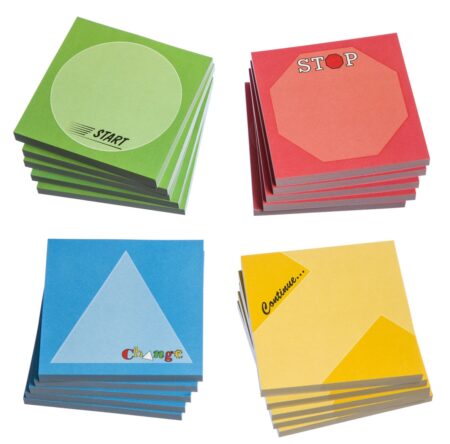
- Instructional Origami: Fold paper into 4 quadrants labeled Start, Stop, Continue, Change. Write answers in 2 minutes.
- “Wonder Wall” – use an interactive meeting whiteboard and ask all participants to use their annotation tool to post “something you wonder about a topic.” This prompt is often more effective than “do you have any questions.” You can respond with answers later so as not to hold up the whole group. Don’t forget to take a screenshot of the board.
Tips for success:
- Make prompts crystal clear
- Allow silent thinking time, without noise, discussion or disruption
- Use a simple timer like an arrow moving across your PPT slide. (HOW TO: create an arrow shape, set the animation to “fly in” from the right and specify the fly-in time to 2 minutes)
FINAL REFLECTIONS
The insights from Cindy Huggett and Katrina Kennedy remind us that effective facilitation isn’t about delivering more content—it’s about creating space for learners to engage, reflect, and take ownership of their learning. Whether it’s sparking early interaction, making the experience social and playful, or weaving in purposeful games and reflection, these interactive training tips ensure that training sessions are not just attended, but remembered. By applying even a handful of their suggestions, you can transform your sessions into dynamic, brain-friendly experiences that truly stick.
MORE RESOURCES
- Learning that Lasts, by Katrina Kennedy.
- The Virtual Training Guidebook, by Cindy Huggett, plus 5 more books.
- A Teachable Moment, by Jim Cain, offers 130 ways to process, debrief, review, and reflect, plus dozens more books.
- Memorable Debriefs



PRODUCTS YOU’LL LOVE!

Easily "gamify" learning events